
Latest & Greatest: Fixing a Website
This is about fixing a website that was never ready for "prime time", and in fact was never going to be ready.
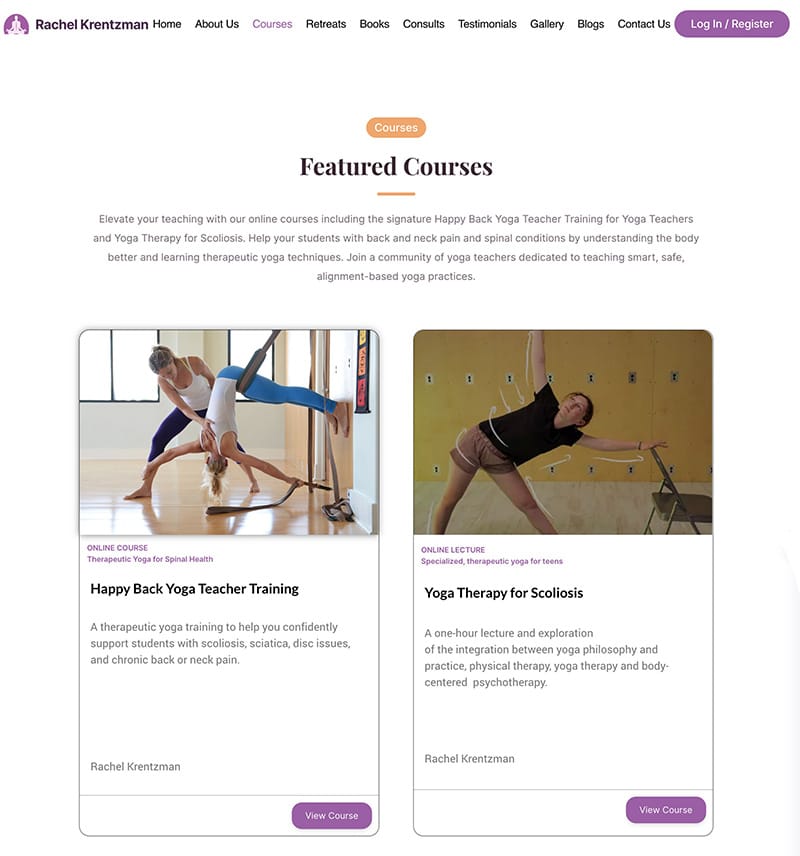
Rachel had a mess on her hands
Rachel hired a freelancer through one of those online marketplace sites to build her yoga therapy website. She liked the design, but the site still wasn't working. On top of that, she was dealing with the usual problems of online freelancers: poor communication, remarks that were ignored or misunderstood, and a freelancer who disappeared for days at a time.
All very frustrating.
So she looked at her options and hired me. I fixed it all: the poor coding, the design, the widgets and modules that were set up wrong, the incredibly slow load times, the site structure that Google didn't like.
Just a typical job for me.
Previous Versions
A networking group that had no networking....
BN4ES stands for Business Networking for English Speakers, a referral group that meets in Ra'anana. Its old website had few organic visitors, because it scored low on all of its parameters. In addition, the visitors who did come didn't stay long.
Fixing a website like this meant more than a new coat of paint. I gave the site a fresh, friendly design and rebuilt the back end. Then I reorganised the content around the questions new members actually ask: how the group works, what Table Members and Frequent Flyers are, where the group meets and how to join. Each page got a clear title, a description and headings that Google can understand, and the FAQ page answers common questions directly.
The result is a site that gives visitors a reason to stay, and gives search engines a clear picture of what BN4ES offers. See it live at bn4es.com.

A John Deere Tractor with George
An original 3D computer-generated illustration, made for a three-year-old who loved tractors, especially ones doing wheelies in the mud. It was one of a series of illustrations created just for this young fan.
3D illustration is also part of my graphic design work, from product visuals for hi-tech companies to playful pieces like this one.

AIMS - Digital Marketing
AIMS Digital has helped Israeli companies market their products around the world since 1998, with PPC advertising, SEO, social media and web analytics. A marketing agency's own website has to set the example, but over the years the site had grown heavy and dated.
I modernised the design and rebuilt key pages with Elementor's newer, lighter building blocks, so the pages load faster and are easier to update. At the same time, I tightened the structure of the site. Each service page now tells visitors and Google clearly what it offers, and every page leads to one clear next step: talk to us.
For a digital marketing company, the website is the shop window. Fixing a website like this means it can once again win the trust of the visitors it works so hard to attract.

Fixing a Website the Right Way
Fixing a website that someone else built often takes longer than building a new one, because the problems are hidden. When fixing a website like Rachel's, I rebuilt the parts that were set up wrong and sped up the pages. I also restructured the site so Google could understand it.
5 Common Problems I Find When Fixing a Website
Slow pages. Huge images, too many plugins and cheap hosting make visitors leave before the page even loads.Broken mobile layouts. Menus, headers and forms look fine on a computer but fall apart on a phone.
A structure Google can't read. Missing page titles, no proper headings, duplicate pages and no sitemap.
Features that don't work. Contact forms that never send, online stores that can't take payments, and popups that won't close.
No backups or security. Outdated plugins, weak passwords and no way to restore the site if something goes wrong.
Plugs ins that were not bought and cannot be updated
How I Approach Fixing a Website
First, I review the whole site: the hosting, the theme, the plugins, the content and how Google sees it. Then I send you an honest assessment that explains what needs fixing and what can stay. Sometimes a few repairs are enough. At other times, rebuilding part of the site on a clean foundation saves money in the long run.
Before I change anything, I make a full backup. I then fix the problems in order of importance, starting with anything that stops visitors from contacting you or buying from you. Finally, I test the site on computers and phones, and I check its speed with Google's free PageSpeed Insights tool.
Why Freelance Marketplace Sites Go Wrong
Cheap freelance marketplaces promise a website in days for a low price. The trouble is that you rarely know who is doing the work, what tools they are using, or whether they will still be around next month. Many of these sites are built from a pile of plugins and a theme the freelancer doesn't fully understand. When something breaks, there is no one to call. Fixing a website like this starts with untangling what was done, before any real improvement can begin.
What Fixing Rachel's Site Involved
The code. Poorly written parts were replaced with clean, standard WordPress building blocks that are easy to maintain.The design. I kept the look Rachel liked, but made it consistent across every page and every screen size.
Widgets and modules. Elements that had been set up wrong were rebuilt so they behave the way they should.
Load times. Slow pages usually come from oversized images, unnecessary plugins and missing caching. Dealing with these made the pages fast.
Site structure. Pages, headings and titles were reorganised so Google can understand what each page is about.
The E-commerce was simply impossible to fix, the app plugin chosen was wrong and Rachels needs did not fit it.
Signs Your Site Needs Fixing
- Your pages take more than a few seconds to load.
- Visitors tell you the contact form doesn't work.
- Your site looks broken on your phone.
- You can't change a sentence without breaking the layout.
- Your host keeps emailing you about outdated plugins or security warnings.
- Google Search Console reports errors, or your site has dropped out of search results.
- The person who built the site no longer answers your messages.
If two or more of these sound familiar, it is worth fixing a website like yours before the problems grow.
Questions to Ask Before You Hire Anyone
Whether you hire me or someone else, a few questions can save you a lot of trouble. Who will actually do the work? Will you own the site, the domain and the hosting account? What happens if something breaks after launch? Will you be able to edit the text and pictures yourself? And can they show you sites they built several years ago that still run well? A good designer will be happy to answer all of these.
Turning Visitors Into Clients
A repaired site should do more than work. It should turn visitors into enquiries. That means a clear message at the top of every page, so visitors know at once that they are in the right place. It means pages that load quickly and work on any phone. It also means trust signals, such as client testimonials and real examples of your work, and a clear next step on every page, whether that is a phone call, a WhatsApp message or a contact form.
How to Measure the Results of Fixing a Website
The best way to see whether fixing a website worked is to measure it. I connect Google Analytics and Google Search Console, so you can follow the numbers that matter: how many visitors find you through Google, how long they stay, which pages they read, and how many of them contact you. Comparing these numbers before and after the repair shows exactly what the work achieved, and points to what to improve next.
Why Clients Trust Me With Fixing a Website
I have designed websites since 1990 and worked with WordPress for over 10 years. You deal directly with me, and I explain what I am doing in plain English. Once your site is fixed, I can also look after updates, backups and security as your WordPress consultant, so it stays fixed. See more of my work in the website portfolio, or read what clients say on the testimonials page.
After the Fix: Keeping Your Site Healthy
Fixing a website is only the first step. WordPress, the theme and the plugins all release updates, and each update can cause new conflicts. I can take care of updates, backups and security every month, so the problems don't come back. I can also send you a short report on your visitors and search performance, with advice on what to improve next.
Common Questions About Fixing a Website
Is it cheaper to fix my site or build a new one?
It depends on what is wrong. After reviewing your site, I will tell you honestly which option makes more sense.
Can you fix a site that wasn't built in WordPress?
Most of my work is in WordPress. If your site uses another platform, I can assess it and recommend the best way forward.
Will my site be offline while you fix it?
Usually not. Where possible, I work on a copy of your site and switch over once everything has been tested.
How long does fixing a website take?
It depends on how many problems there are. Small repairs can be quick, while a site that needs rebuilding takes longer. I will give you a timeline after the review.
If a freelancer left your site unfinished, contact me for an honest assessment of what it needs.